



Wake ID Portal is the central hub for accessing the vast array of resources and services the Wake County Public School System (WCPSS) offers. As one of the premier school districts in North Carolina and the United States, WCPSS utilizes the Wake ID Portal to connect students, parents, teachers, staff, and community members to the tools they need to thrive. In this article I will guide the features and functionalities that make the Wake ID Portal indispensable to the WCPSS experience.
What is the Wake ID Portal?

Wake ID Portal is a single sign-on gateway for accessing all WCPSS applications from one secure, centralized platform. Instead of having to remember dozens of usernames and passwords for various services, Wake ID Portal allows users to log in once with their Wake ID credentials to reach:
- WCPSS email, calendars, and contact information
- Class schedules, assignments, grades, and transcripts
- Library resources and multimedia tools
- Productivity software and collaboration spaces
- Administrative systems and educator resources
- And much more!
Wake ID Portal makes interacting with critical systems easier with a simple, intuitive interface designed for convenience.
Key Benefits of Using Wake ID Portal
Wake ID Portal empowers users by providing the following:
- Simplified Access: Single sign-on connectivity to all WCPSS applications.
- Enhanced Security: Secure storage and transmission of login credentials.
- Customizable Experience: User-specific dashboard with relevant apps and info.
- Mobile Compatibility: Access Wake ID Portal on smartphones and tablets.
- Intuitive Navigation: Easy-to-use interface and built-in support options.
As the backbone of digital teaching and learning in WCPSS, Wake ID Portals offers indispensable advantages to students, parents, educators, and community stakeholders.
Who Uses Wake ID Portal?
Wake ID Portal serves a diverse community of users across Wake County:
Students
- Access course materials, submit assignments, collaborate with peers and teachers
- View schedules, grades, test scores, college, and career planning tools
- Email teachers, sign up for activities and events, manage digital lockers
Parents & Guardians
- Monitor student progress, view schedules, grades, and attendance records
- Communicate with teachers and school staff regarding student development
- Manage Wake ID account settings, enable automatic alerts and notifications
Teachers & Staff
- Distribute assignments, grade student work and exams, upload lesson resources
- Maintain digital grade books, upload attendance data, recordkeeping
- Access WCPSS email, calendars, productivity software, store and share files
District Leaders & Administrators
- Oversee district operations through dashboards and analytics
- Manage human resources functions—onboarding, payroll, benefits
- Maintain employee records, generate reports to inform data-driven decisions
Community Members
- Discover community event listings, programs, and registration tools
- Make payments for programs and services using integrated payment processing
- Stay up to date on school board meetings, district initiatives, and news
Key Features and Tools
Wake ID Portal grants access to critical systems and resources most relevant to each user’s role. While offerings continue expanding, core capabilities include:
Students:
- PowerSchool: Student Information System for schedules, grades, assignments
- Canvas: Learning Management System for online lesson delivery
- G Suite: Email, documents, cloud storage, video conferencing
- Destiny Discover: Library search engine, eBook rentals, research tools
- Naviance: College and career readiness platform
Parents:
- PowerSchool: Monitor child’s grades, attendance, schedule
- MyPaymentsPlus: Manage student lunch accounts, fees, deposits
- Here Comes the Bus: Real-time school bus tracking
Educators:
- PowerTeacher: Gradebook, attendance tracking, assignment creation
- Canvas: Build an online curriculum and lesson delivery system
- G Suite: Productivity suite, calendars, shared drives for collaboration
Administrators:
- PowerSchool: Student information system analytics and reporting
- frontline: HR management platform for recruiting, onboarding, absence tracking
- Performance Matters: Assessments, analytics, personalized learning insights
And much more! As Wake ID Portal evolves into a comprehensive digital ecosystem, new services arise continually.
Creating a Wake ID Account
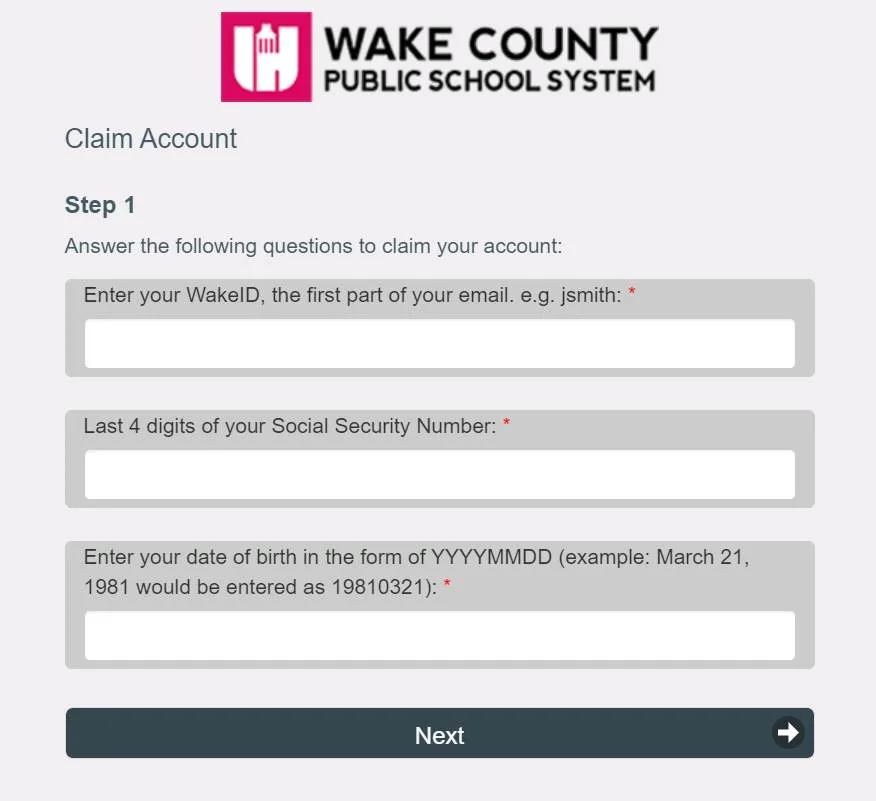
Users must first create a Wake ID account to access Wake ID Portal tools and resources.
- Visit https://wakeid.wcpss.net/
- Select “Create Account”
- Choose the account type you wish to make: Student, Parent/Guardian, Teacher/Staff
- Fill in the required fields with your details
- Agree to the Terms of Use
- Verify account via email confirmation
Once registered, return to https://wakeid.wcpss.net/ to log into your Wake ID Portal!
Common Account Creation Issues
Don’t worry if you encounter problems when registering your Wake ID. Common issues include:
- Difficulty receiving email verification message
- Error messages about invalid or duplicate entries
- Uncertainty about proper account type selection
Contact the WCPSS Service Desk at (919) 694-8100 with any registration difficulties. Helpful support specialists can answer questions and troubleshoot issues over the phone.
Detailed tutorials also reside within the Wake ID Portal after logging in via the “How Do I…?” support menu.
Logging into the Wake ID Portal

Accessing the Wake ID Portal to reach WCPSS resources requires proper login credentials consisting of the following:
- Username: Assigned during account registration
- Password: At least eight characters, including letters and numbers
Then, open any browser and:
- Navigate to https://wakeid.wcpss.net/
- Enter Username and Password
- Click Log In
After successful authentication, the Wake ID Portal dashboard displays authorized applications available via single sign-on.
Alternative Login Methods
For convenience, WakeID login options include:
- Clever Badge: Scan personalized QR code instead of typing credentials
- SSO: Auto-login from third-party tools like Canvas after configuring trusted access
The Wake ID mobile app also enables swift access from iOS or Android devices.
Resetting Forgotten Passwords
If you forget your Wake ID password, resetting is quick and easy through automated tools:
- Visit login page at https://wakeid.wcpss.net/
- Click “Forgot Password?”
- Enter Username when prompted
- Choose to reset your password via text/phone call or email
For added accountability, enable biometric authentication like fingerprints or facial recognition through your device settings. Enrolling in multifactor authentication (MFA) also helps secure access by requiring the entry of a unique verification code and your password during login.
Key Applications and Resources
Myriad WCPSS applications and digital resources become available by signing into the Wake ID Portal. Offerings cater specifically to each user’s role—student, educator, parent, or community member.
While products continuously evolve, highlight solutions include:
PowerSchool: Comprehensive student information system (SIS) constituting the district’s core administrative platform supporting needs like:
- Grading, attendance, schedule management
- Analytics and reporting for informed decisions
- Content management for mass notifications
- Registration, enrollment, transfers
Canvas: Leading learning management system (LMS) centralizing educational content delivery via:
- Online assignment, quiz, and test creation/submission
- Robust grade book functionalities
- Discussion boards facilitating collaborative learning
- Multimedia embedding for interactive lesson building
- Mobile app enabling learning on-the-go
G Suite for Education: Google’s productivity solution includes:
- Email, document editing, cloud storage
- Video conferencing capabilities
- Shared drives facilitating project collaboration
And other pivotal platforms like Destiny Discover, Performance Matters, Frontline, etc.
The full scope of Wake ID Portal’s offerings empowers users with consolidated access to thriving digital environments purpose-built for impactful teaching and learning.
Personalizing Your Wake ID Portal Experience
The intuitive Wake ID Portal interface allows customization so users can tailor their experiences to display the most relevant apps and info at a glance.
To edit dashboard components:
- Click your Username (profile icon)
- Navigate to Settings > Additional Options > Personalize Experience
- Drag-and-drop, hide/show, or reorder modules
Personalized components may include:
- Shortcuts to frequently used apps
- Sticky notes for jotting down reminders
- Custom RSS feeds from WCPSS news/events
- Action cards linking important pages
- Bookmarked resources
- And more!
Configuring your ideal portal layout helps boost productivity by displaying vital tools for your role in a consolidated view requiring just one login.
Wake ID Portal on Mobile Devices
Thanks to native iOS and Android apps, Wake ID facilitates secure access on smartphones and tablets for working untethered.
Key highlights:
- Mobile-friendly interface
- Biometric login (Touch ID, Face ID)
- Push notifications
- Offline accessibility for selected content types
Whether at home, on the go, or in the classroom, the Wake ID app empowers users with an on-demand connection to WCPSS resources—anytime, anywhere while maintaining privacy protections through granular permission settings.
Student-Specific Wake ID Portal Capabilities
For pupils, the Wake ID Portal facilitates essential academic activities like:
Accessing Course Materials and Assignments
- Canvas course pages house syllabi, multimedia content, discussions, assessments
- PowerSchool hosts grades, schedules, teacher contact info
- G Suite contains collaborative workspaces for group assignments
- Destiny Discover offers access to 20+ million eBook titles and research aids
Tracking Progress
- PowerSchool: Gradebook, assignment scores feedback, attendance records
- Canvas: Monitor course performance analytics for mastery
- Naviance: Personalized college/career prep recommendations
Communicating with Teachers
- WCPSS Gmail: Email teachers questions, receive reminders
- Canvas Inbox: Private direct messaging with instructors
- Google Chat/Drive: Collaborative workspaces for project-based learning
By centralizing these essential tools conveniently under one platform, Wake ID Portal helps students own their learning journey like never before.
Features for Educators and Staff
For WCPSS teachers and employees, Wake ID Portal delivers robust productivity enablers:
Curriculum Authoring Tools
- Canvas course creation/management: Build online modules, multimedia inclusion, and assessments
- G Suite: Interactive lesson planning, distribution of materials
- PowerSchool: Post assignments/grades, attendance tracking
Collaboration Environments
- WCPSS Gmail/Chat/Calendar: Communicate across schools/districts
- Google Drive: Share feedback on collaborative documents
- Canvas Communities: District-wide forums facilitating best practice sharing
Professional Development Opportunities
- Canvas Catalog: Self-paced video courses for skills building
- PowerSchool Learning: Manage PD events, external training, recordkeeping
- Performance Matters: Analyze instruction efficacy, student growth opportunities
Administrative Functionalities
- Frontline: Talent management via recruitment, onboarding, substitute placement
- PowerSchool SIS: Enrollment management, reporting, content management for notifications
By promoting seamless interoperability between critical work apps, Wake ID Portal allows educators and staff to maximize their productivity and focus efforts on accelerating student success.
Parent/Guardian Tools in Wake ID Portal
For moms, dads, and guardians, Wake ID unlocks convenient monitoring of student progress via:
PowerSchool Parent Portal
- Student grades, attendance reports, schedule
- Assignment listings with due dates
- Email teachers questions/concerns
Canvas Observer Access
- Review course content, assignments, due dates
- Configure notifications for grade changes
Here Comes the Bus
- Live-updated maps of bus locations
- Customizable alerts when a child’s bus nears a stop
MyPaymentsPlus
- Manage student lunch accounts
- Pay outstanding fees 24/7 online
Equipped with real-time insights into their children’s development, parents can foster open communication with teachers and form targeted plans for unlocking every student’s potential.
Security in Wake ID Portal
As stewards of sensitive student data, WCPSS devised the Wake ID Portal under strict cybersecurity protocols guided by industry best practices, including:
Network Security
- Firewall systems mitigating malware hacking risks
- Regular penetration testing for system vulnerabilities
- Ongoing network infrastructure enhancements
Access Controls
- Role-based access restrictions on accounts
- Multifactor authentication requirements
- Session timeouts after periods of inactivity
Secure Data Transmission
- Exclusive use of encrypted protocols like HTTPS
- Unique access tokens for each login session
- Limited data retention periods
Adhering to elevated security standards helps WCPSS safeguard stability, prevent unauthorized access, and prioritize user privacy.
By taking proactive cybersecurity education courses released in the Wake ID Portal, students and employees can also help protect themselves online. Visit the Canvas Catalog for cyber safety modules, including:
- Securing your Wake ID account
- Spotting phishing attempts
- Developing strong passwords
- Managing social media settings
- And more!
Getting Help with the Wake ID Portal
Wake ID Portal tools strive for intuitive designs that enable self-guided usage. However, questions sometimes arise when navigating digital ecosystems. If you need assistance, WCPSS provides helpful support channels, including:
Built-In Chat Features
- Canvas Help Menu: Interactive troubleshooting, submitting support tickets
- PowerSchool Community: Query knowledge base articles or ask peers questions
WCPSS Service Desk
- Phone support is available 24/7
- Submit email tickets to track responses
Public Resources
- YouTube Video Tutorials: Step-by-step guidance on using tools
- Quick Reference Documents: Downloadable “how to” instructions
Don’t hesitate to utilize these resources when facing Wake ID difficulties. WCPSS stands ready to help users unlock maximal value from digital environments vital to growth.
The Future of Wake ID Portal
As one of America’s largest and highest-performing school districts, WCPSS built the Wake ID Portal as a scalable platform primed for enduring expansion.
Upcoming innovations include:
- Enhanced global search: Query responses across multiple data sources
- Improved third-party integrations: Extended customization via partner solutions
- Ongoing mobility enhancements: Streamlined workflows regardless of device
- Extended analytics: Data visualizations identifying usage trends, opportunities
Through sustained technological progress, tomorrow’s students can inherit a smarter Wake ID Portal poised to revolutionize teaching and learning digitally across Wake County.
Conclusion
Wake ID Portal empowers all participants in the instructional process with simplified access to dynamic solutions and uplifting outcomes. By providing a unified gateway to resources engendering engaging curriculums, transparent progress oversight, and collaborative workspaces, Wake ID Portal helps unlock every WCPSS learner’s potential to excel. Driven by an ethos of educational innovation, WCPSS approaches the future in partnership with all Wake County families to nurture community growth for years to come.